|
Dual Motor Low Voltage Control Recommended
Installation and Wiring Instructions
LOW VOLTAGE WIRING INSTRUCTIONS
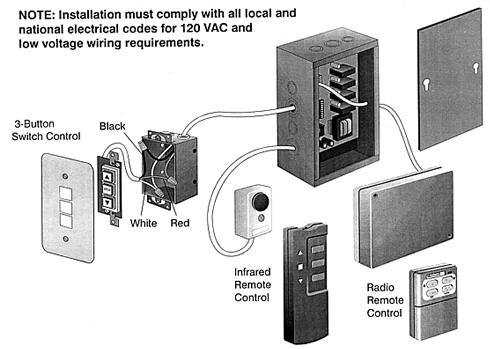
Switch Control Wiring
- Mount the 3-button switch(es) in a
standard gang box at the desired location(s).
- Run three low voltage wires to the 2 gang
box from each 3-button switch, and connect
the black, red and white wires to the switch
interface terminal as indicated in the
drawing above.
OPTIONS
Radio Remote Control Connection
- Securely attach the radio receiver
adjacent to the controller.
- Attach the plug from the receiver into the
telephone jack on the control board as
indicated in the drawing above.
- If it is necessary to change the
transmitter and receiver code, please call
the Da-Lite Customer Service Department at
1-800-622-3737 or 219-267-8101 for
instructions.
Infrared Remote Control Connection
- Securely attach the IR sensor at a
location close to the screen, but visible
from where the transmitter will be operated.
- Attach the plug from the sensor into the
connector on the control unit as indicated
in the drawing above.
Auxiliary Control Connection
- Run wires to the Low Voltage Control from
the Auxiliary Control location and connect
the black, red and white wires to the switch
interface terminal as indicated in the
wiring diagram above.
- A closure of 0.5 seconds between the Black
and White terminals moves the screen Up.
- A closure of 0.5 seconds between the Red
and White terminals moves the screen Down.
- A simultaneous closer of 0.5 seconds
between Up, Down, and Common will STOP the
screen in its current position.
LINE VOLTAGE WIRING INSTRUCTIONS
WIRING STEPS FOR DUAL MASK ELECTROL
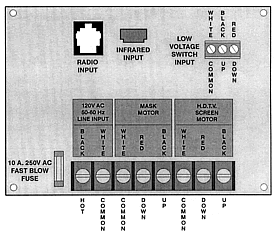
- Connect the motor cable to the Dual Motor
Low Voltage Control per the wiring chart
below.
- Connect the 3-button switch or the
wireless controller.
- Connect the power source to the control
box, and then apply power.
- Install the cover plate on the control
box.
- Test the projection screen and the mask
using the following procedure:
- Press the DOWN button and the projection
screen descends.
- Press DOWN button again and the mask
descends.
- Press the UP button and the mask ascends.
- Press the UP button again and the
projection screen ascends.
NOTE: A 10 Amp, 250 VAC fuse protects the
controller in case of a wiring problem. This
standard fuse can be found in any electrical
supply store
CAUTION GROUNDING CONTINUITY: If
metallic conduit is not used throughout the
screen and control installation, grounding
conductors are required to provide a ground
continuity between the screen and the control
unit
WIRING STEPS FOR ELECTROL WITH VIDEO LIFT
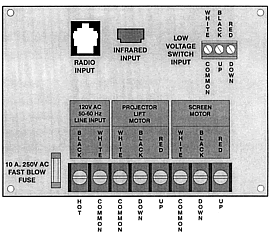
- Connect screen motor and video lift cable
to the control box per the instructions
below.
- Connect the 3-button switch or the
wireless controller.
- Connect the power source to the control
box, and then apply power.
- Install the cover plate on the control
box.
- Test the screen and lift using the
following procedure:
- Press the DOWN button and the projection
screen descends.
- Press DOWN button again and the mask
descends.
- Press the UP button and the mask ascends.
- Press the UP button again and the
projection screen ascends.
NOTE: A 10 Amp, 250 VAC fuse protects the
controller in case of a wiring problem. This
standard fuse can be found in any electrical
supply store.
CAUTION GROUNDING CONTINUITY: If
metallic conduit is not used throughout the
screen and control installation, grounding
conductors are required to provide a ground
continuity between the screen and the control
unit
NOTE: The information contained herein is
believed to be accurate and reliable as of the
publication date, December, 1999. Please consult
Da-Lite to ensure that you have the most
up-to-date product specifications. Da-Lite
reserves the right to update, change or improve
this product without prior notice.
|







![[Product Information]](../subpage_images/splash_left_r01_c1.gif)
![[Home Theater]](../subpage_images/splash_left_r06_c1.gif)
![[Educational Materials]](../subpage_images/splash_left_r02_c1.gif)
![[What's Hot]](../subpage_images/splash_left_r04_c1.gif)

![[The Power In Presentation Products]](../subpage_images/splash_left_r09_c1.gif)